Product

Chrome Extension

Capture Everything from LinkedIn
Capture every profile, connection, and message you make on LinkedIn.
Work your CRM from LinkedIn
Add notes, tasks, sequences, lists, and templates straight from the LinkedIn profile.

Platform

Build outbound lists in your CRM
Search 200M+ contacts, export Sales Navigator in bulk, and enrich your whole list in seconds
Track LinkedIn team activity
See your team's LinkedIn activity, funnel, and performance in one dashboard, broken down by rep.

Operate on LinkedIn quickly

HubSpot LinkedIn Integration
Run HubSpot from inside LinkedIn. No tab-switching.
Salesforce LinkedIn Integration
Run Salesforce from inside LinkedIn. No tab-switching.

Quick links

Ready to get started?
Sign up for free
Pricing
Watch demo
Chat to sales
Solutions
How Hublead can help you automate your work
Sales Reps
Move fast, stay organized, and avoid manual CRM work.
Sales Managers
Visibility, consistency, and a reliable workflow to coach reps and hit targets
Founders
Move fast without jumping between tools or handling manual CRM updates, data entry, or cleanup.
RevOps
Clean data, visibility into LinkedIn activity, and automation that actually works.
How Hublead is the best tool to integrate your favorite CRM to LinkedIn
HubSpot LinkedIn Integration
Connect LinkedIn to HubSpot in one click.
Salesforce LinkedIn Integration
Connect LinkedIn to Salesforce in one click.
Latest playbook published
Trigger a HubSpot sequence automatically when a LinkedIn invitation is accepted
Learn how to automatically enroll contacts into a HubSpot sequence when a LinkedIn invitation is accepted, using HubSpot workflows and Hublead.
LinkedIn invitation acceptance triggering a HubSpot sequence
Ready to get started?
Sign up for free
Pricing
Watch demo
Chat to sales
Resources
Hublead
Quick Start Guide
Get started with Hublead in just a few steps.
Help Center
Find answers, tutorials, and troubleshooting tips.
Our playbooks
Find our playbooks to leverage Hublead with HubSpot
Affiliate Program
Earn rewards by sharing Hublead with others.
LinkedIn Outbound
HubSpot LinkedIn Integration Guide
Learn how to connect LinkedIn to HubSpot in simple steps.
Salesforce LinkedIn Integration Guide
Learn how to connect LinkedIn to Salesforce in simple steps.
Our blog
Learn how to set up the best outbound strategy!
Youtube Channel
Watch quick tutorials and start prospecting faster.
Featured Playbook
View your LinkedIn pipeline as a Kanban Board
Build a library of practical, high-impact Hublead use cases that help users understand exactly how to leverage Hublead inside HubSpot.
Pricing
Log in
Try for Free
Already have an account?
Log in
August 21, 2026
2
min read
bastien-paul-avatar
Bastien Paul
Toolkit
Table of contents
  • Problem
  • What you get
  • Prerequisites
  • 1. Filter your unreachable connections
  • 2. Save it as a list
  • 3. Enrich the emails with Hublead
  • 4. Start reaching them by email
  • Result
  • FAQs
Back to playbooks

Turn LinkedIn connections without an email into reachable HubSpot contacts with Hublead

Find your LinkedIn connections that have no email in HubSpot and enrich them in one go, so you can reach them by email too.

Problem

You have hundreds of LinkedIn connections synced into HubSpot, but a big share of them have no email address. So you can only reach them by LinkedIn message, one at a time. Your warmest network is stuck in a channel you cannot automate.

What you get

  • A clean list of contacts who are connected on LinkedIn but unreachable by email
  • Their emails filled in one bulk action with Hublead
  • A warm audience you can drop into a HubSpot sequence or workflow, not just DM

Prerequisites

  • Hublead active (Professional, Business or Scale)
  • LinkedIn Connection Status syncing onto your HubSpot contacts (Hublead sets it)
  • Email credits left on your plan: 600 on Professional, 6,000 on Business, 12,000 on Scale

1. Filter your unreachable connections

In HubSpot go to Contacts and build a filter:

  • LinkedIn Connection Status is Connected
  • AND Email is unknown

That is your pool of connected-but-unreachable contacts.

2. Save it as a list

Save the filtered view as an active list called "Connected, no email" so it keeps refreshing as new connections sync in and stays ready to work.

The HubSpot Outbound Handbook.
Free Guide

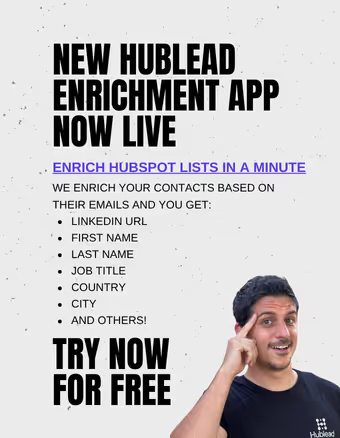
Hublead Enrichment

Select any list in HubSpot and enrich your contacts in minutes.

Ready to fix your outbound process?

Join 8,000+ sales teams who search, enrich, and push to Salesforce in one click.
Try Hublead for free

3. Enrich the emails with Hublead

Select the list and run Hublead enrichment on it. Hublead finds the professional email for each contact and writes it back to HubSpot.

  • It only fills contacts where Email is empty, it never overwrites an existing address
  • Each enriched email uses one of your plan's email credits

4. Start reaching them by email

Once the emails land, the list becomes an audience you can actually automate:

  • Enroll them in a HubSpot sequence
  • Add them to a nurture workflow
  • Or hand a rep a task list of warm, now-emailable contacts

Result

Your warm LinkedIn network stops being a pile of names you can only DM. It becomes a reachable, emailable list you can sequence and nurture like any other HubSpot audience, without leaving a single warm connection stuck on LinkedIn.

The HubSpot Outbound Handbook.
Free Guide

Hublead Enrichment

Select any list in HubSpot and enrich your contacts in minutes.

Ready to fix your outbound process?

Join 8,000+ sales teams who search, enrich, and push to Salesforce in one click.
Try Hublead for free

FAQs

How many contacts can I enrich?

It depends on your plan's email credits: 600 on Professional, 6,000 on Business, 12,000 on Scale per month.

Does it overwrite existing emails?

No. Hublead only fills contacts where the email is empty, so your existing addresses are safe.

Where does LinkedIn Connection Status come from?

Hublead sets it on the contact when it syncs your LinkedIn connections into HubSpot, so you can filter on who is actually connected.


Discover our new ebook

See HubSpot data on LinkedIn, no need to switch tabs every time you're landing on a prospect.

Try Hublead for Free

Ready to fix your outbound process?

Join 8,000+ sales teams who search, enrich, and push to your CRM in one click.
Try Hublead for free
Simplify LinkedIn outbound with Hublead
Language
US
DE
FR
ES
GREAT RESOURCES
HubSpot LinkedIn Integration
Sync LinkedIn Messages to HubSpot
How to Import LinkedIn Contacts to HubSpot CRM
LinkedIn Sales Navigator HubSpot Integration
10 Best Tools for HubSpot Data Enrichment in 2026
How to Use HubSpot for Lead Generation: A Simple Guide
COMPANY
Quick overview of Hublead
Help Center
Playbooks
HubSpot LinkedIn Integration
Salesforce LinkedIn Integration
Alternative
Privacy Policy
Terms of Service
Data Protection Agreement
© 2026 Hublead